


Download ZModeler – 3D Modeling Software, Free & Secure
Overview of ZModeler
ZModeler is a powerful graphics and design tool that focuses on 3D modeling for Windows users. Though it is offered as a free application, it packs a professional‑grade feature set that appeals to advanced users, modders, and game‑development enthusiasts. The software’s primary goal is to let creators build realistic‑looking models without having to learn complex programming languages or invest in expensive commercial licenses. While ZModeler is not designed for beginners, its flexibility and speed make it a favorite among those who need precise control over geometry, textures, and export options.
One of the standout characteristics of ZModeler is its “no‑install” approach. After downloading the executable, users simply double‑click the file to launch the program, eliminating the need for lengthy setup wizards or registry changes. This lightweight delivery method also means that the application can be run from a portable drive, making it handy for developers who work across multiple workstations.
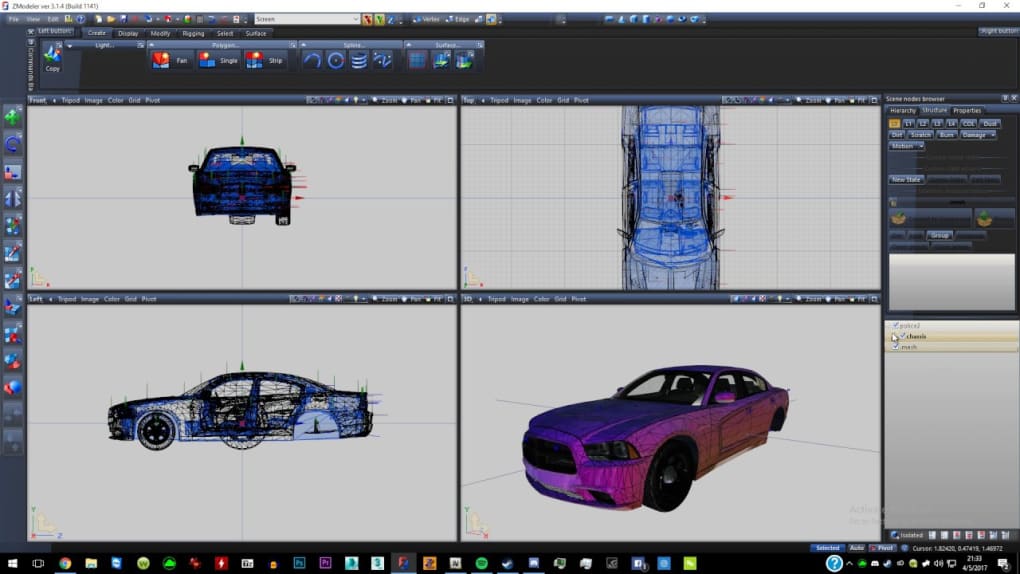
The interface, while functional, can feel intimidating at first glance. Nine distinct viewports let you toggle between orthographic, perspective, and custom camera angles, providing a comprehensive environment for fine‑tuning every detail of a model. Navigation is streamlined through keyboard shortcuts – for example, pressing SPACEBAR activates the selection tool, while SEL on the menu bar does the same. Once a model is complete, ZModeler supports saving in its native YFT format and exporting directly to popular game engines, making it a bridge between creative concepts and interactive experiences.
Because the software is free, it does not come with official technical support, but an active community of modders and hobbyists shares tips, tutorials, and troubleshooting guides on forums and social media. This community-driven ecosystem helps new users overcome the learning curve and unlock the full potential of ZModeler’s robust toolset.
Key Features & Capabilities
- Portable Execution: No installation required – launch directly from the executable.
- Multi‑Viewport System: Nine customizable views for precise model inspection.
- Advanced Selection Tools: SEL button and SPACEBAR shortcut for rapid element selection.
- YFT Native Format: Save projects in a format optimized for game‑modding workflows.
- Export Flexibility: Direct export to major game engines and 3D file types.
- Texture Mapping & UV Unwrapping: Built‑in tools for realistic surface detailing.
- Mesh Editing Suite: Supports extrusion, beveling, and subdivision for complex geometry.
- Performance Optimized: Low memory footprint, suitable for high‑end PCs with ample RAM.
- Community Resources: Access to tutorials, scripts, and user‑generated plugins.
Each of these features works together to create a workflow that feels both powerful and efficient. The multi‑viewport system, for instance, allows designers to compare orthographic and perspective views side‑by‑side, reducing the need to constantly switch camera modes. The selection tools are responsive, letting you click or press a key to highlight vertices, edges, or faces, which speeds up the editing process considerably.
Texture mapping in ZModeler is another area where the software shines. Users can import bitmap textures, apply them to UV‑unwrapped surfaces, and adjust scaling directly within the viewport. This eliminates the need for external programs for simple texture work, making it a one‑stop solution for many indie developers.
While ZModeler does not include built‑in rendering capabilities, its export functions allow seamless hand‑off to rendering engines such as Unreal Engine, Unity, or Blender. The YFT format preserves material assignments and hierarchy, ensuring that the model behaves exactly as intended once imported into a game engine.
Installation, Setup & Everyday Usage
Downloading and Launching
Getting started with ZModeler is straightforward. Visit the official website, click the “Download for Windows” button, and wait for the small (< 5 MB) executable to finish downloading. Because the program is portable, there is no installer to run – simply locate the file, double‑click, and the application opens instantly.
Initial Configuration
Upon first launch, ZModeler presents a clean workspace with nine viewports arranged in a grid. You can customize which viewports are visible by right‑clicking the viewport bar and selecting your preferred layout. For users who prefer a single large viewport, the “Full Screen” mode can be activated with F11. The program automatically detects your display resolution and scales UI elements accordingly, which is useful on high‑DPI monitors.
Creating Your First Model
Start by pressing the SEL button or hitting the SPACEBAR to activate the selection tool. Click anywhere in the viewport to place a vertex, then use the Extrude command (found under the “Edit” menu) to extend edges into 3D shapes. The Bevel option adds smooth transitions between faces, a technique commonly used for organic models.
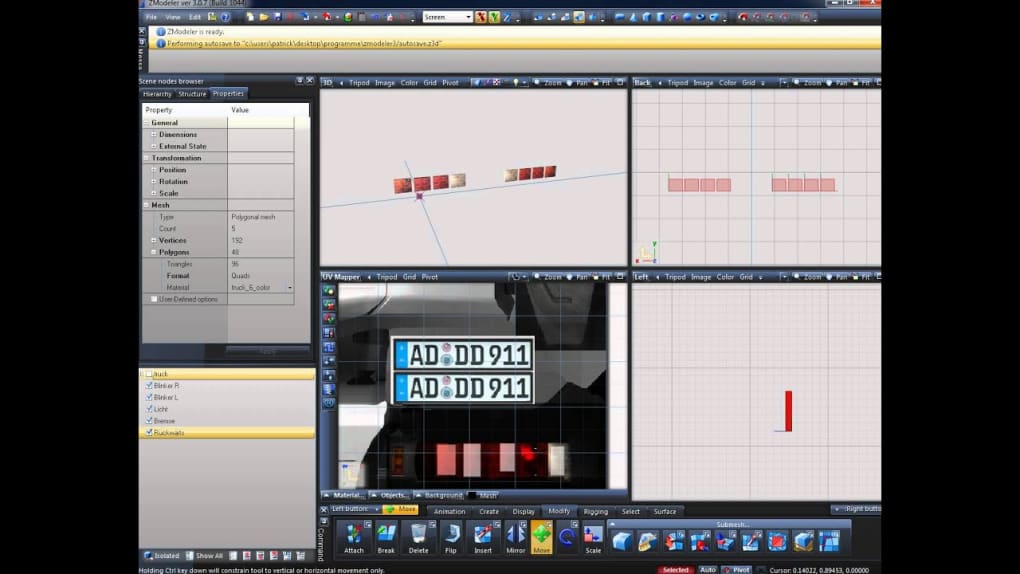
When you’re ready to apply textures, open the “Materials” panel, import a PNG or JPG file, and drag it onto the selected face. ZModeler automatically generates UV coordinates, but you can fine‑tune them using the “UV Editor” for precise alignment. Once your model is complete, go to File → Save As and choose the YFT format. If you need the model in another format, select Export and pick from OBJ, FBX, or a custom game‑specific package.
Tips for Efficient Workflow
- Use Ctrl + Z liberally – ZModeler supports unlimited undo levels.
- Keep the “Layers” panel open to organize complex scenes into manageable groups.
- Leverage the community‑created scripts (found on the official forum) to automate repetitive tasks such as batch renaming or mass UV scaling.
- Regularly save incremental versions (e.g., Model_v1.yft, Model_v2.yft) to avoid data loss.
Compatibility, Pros & Cons
ZModeler is built exclusively for the Windows operating system, supporting Windows 10, Windows 11, and legacy Windows 7 (with .NET Framework 4.7 installed). The application runs smoothly on both 32‑bit and 64‑bit architectures, though a 64‑bit environment is recommended for handling large scenes with high‑resolution textures.
Pros
- Free to download and use – no hidden fees or subscription plans.
- Portable execution eliminates the need for admin rights on restricted machines.
- Rich set of modeling tools suitable for professional‑grade game assets.
- Direct export to popular game engines reduces pipeline friction.
- Active community provides tutorials, plugins, and troubleshooting help.
Cons
- Steep learning curve for newcomers; UI can feel cluttered.
- Limited to Windows – no native macOS, Linux, Android, or iOS versions.
- No built‑in rendering engine; requires external software for final visual output.
- Official support is community‑driven, which may delay resolution of obscure bugs.
- High‑detail scenes can consume significant RAM, necessitating a powerful workstation.
Frequently Asked Questions
Is ZModeler really free or are there hidden costs?
ZModeler is completely free to download and use. There are no subscription fees, trial periods, or hidden in‑app purchases. All core modeling features are available without any cost.
Can I run ZModeler on a Mac or Linux computer?
Officially, ZModeler supports only Windows (10, 11, and 7). Some users have reported limited success using compatibility layers like Wine on Linux, but this is not officially supported and may cause stability issues.
What file formats can I export from ZModeler?
ZModeler’s native format is YFT, which preserves material and hierarchy data. For external use, you can export to OBJ, FBX, and several game‑specific formats (e.g., GTA V .yft, RDR2 .yft) directly from the Export menu.
Do I need a powerful PC to use ZModeler effectively?
While ZModeler runs on modest hardware, creating complex scenes with high‑resolution textures can quickly consume RAM. For smooth performance, a system with at least 8 GB of RAM (16 GB recommended) and a modern GPU is advisable.
Is there any official support or documentation?
Official support is limited to community forums, Discord channels, and user‑generated tutorials. The developer provides a basic online manual, but most advanced topics are covered by community‑driven resources.
Final Verdict & Call to Action
ZModeler stands out as a free, portable 3D modeling solution that delivers a professional feature set without the overhead of a paid license. Its nine‑view system, robust mesh editing tools, and direct export capabilities make it especially attractive to modders and indie game developers who need a reliable pipeline from concept to in‑game asset. The primary drawbacks—Windows‑only availability and a steep learning curve—are offset by the vibrant community that constantly shares scripts, tips, and workflow optimizations.
If you have a Windows PC and are looking for a cost‑effective way to create detailed 3D models for games or visualizations, ZModeler is a compelling choice. Download the executable today, explore the tutorials on the official forum, and start turning your creative ideas into tangible assets.
Ready to unleash your creativity? Click here to download ZModeler now and begin building realistic 3D models for free.







